

Quick answer: An AI aimbot captures frames from your monitor, uses a detection model to find visible enemies, and moves your crosshair toward them while you hold your aim key. Evicted's AI Aimbot does this across 10 games on one subscription, from $23.95 for 7 days.
An AI aimbot analyzes screen frames, uses a detection model to identify visible enemies, and sends mouse commands to move your crosshair toward them. You get that functionality across 10 games with Evicted's AI Aimbot, plus an installer and setup video, with most access keys arriving within 60 seconds after payment.
What is an AI aimbot?
An AI aimbot connects enemy recognition in screen images to automatic aiming while you hold a selected key.
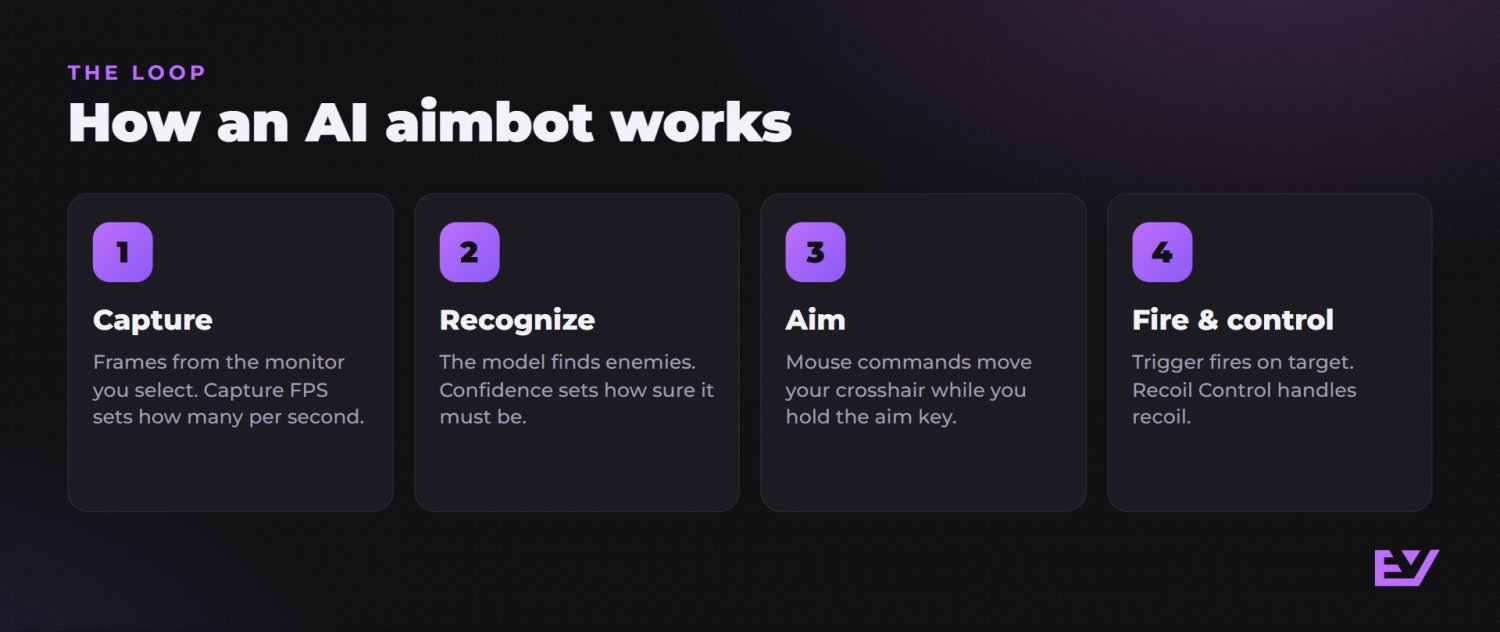
Think of it as a loop: capture an image, identify an enemy, apply the recognition settings, then send movement commands. As the program analyzes more frames, it uses that visual input to follow the enemy with your crosshair.
The menu makes more sense when you separate recognition from movement. Recognition controls determine what the program accepts as an enemy. Movement controls determine how aiming begins and how the crosshair moves toward that target. Understanding that split gives each setting a clear job before you start changing values.
How does an AI aimbot see enemies?
It captures frames from the monitor you select and analyzes those images, so it aims at what you can see on screen.
Monitor chooses the display that supplies the images. If your PC has several monitors, this setting tells the program which one to capture. The screen showing your game supplies the visual input for enemy recognition.
Capture FPS controls how many screen frames the program analyzes each second. This is the analysis frequency, separate from the frame rate your game renders. A game producing frames and a model examining captured frames are two different parts of the process.
For example, choosing another monitor changes which images enter the system. Changing Capture FPS changes how many images are analyzed per second. Neither setting defines what qualifies as an enemy; that comes from the detection controls.
How does it decide what is an enemy?
Model handles enemy recognition, Confidence sets the acceptance threshold, FOV defines the scanned area, and Target Game selects the game context.
- Model offers detection choices focused on speed, accuracy or balance. You choose the priority for the recognition stage. These options describe the model's focus; they do not give you a measured response time or accuracy percentage.
- Confidence sets how sure the model must be before accepting an object as an enemy. A higher threshold requires more confidence, while a lower threshold requires less. This setting governs whether a recognition qualifies for acceptance.
- FOV sets the size of the screen area scanned for enemies. A smaller area narrows the search, while a larger area expands it. You can understand the distinction with two questions: FOV asks where to look, and Confidence asks how certain recognition must be.
Target Game selects the game the detection system should work with. Together, these settings define the recognition task before mouse movement comes into play. Changing Smoothing later affects movement; it does not replace choosing the game or setting the recognition threshold.
How does it move your crosshair?
It sends mouse movement commands through the selected Mouse Input method, and your crosshair follows the enemy while you hold the aim key with aiming enabled.
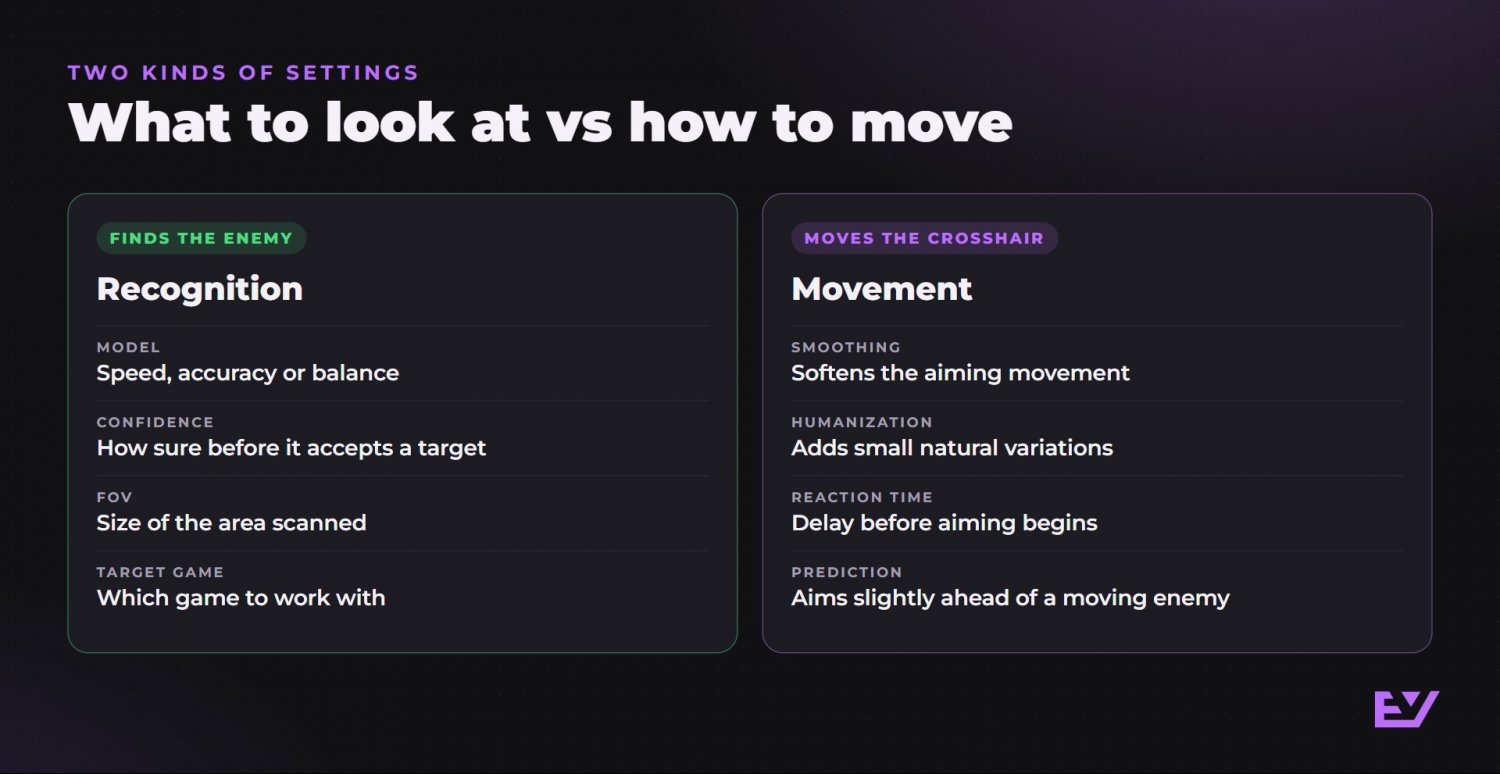
- Enable Aimbot is the main on/off control. Your selected aim key engages automatic aiming while held. Mouse Input selects how movement commands are sent to the mouse, giving the recognition stage a way to translate a target into crosshair movement.
- Smoothing softens the aiming movement. Its purpose is to shape how the crosshair moves toward the enemy. Humanization adds small natural variations to that movement. The two controls affect different qualities: softness and variation.
- Reaction Time adds a delay before aiming begins. If you are trying to understand when movement starts, this is the relevant control. Smoothing affects the movement itself once it begins.
- Prediction estimates enemy movement and aims slightly ahead of a moving target. That makes it the control concerned with leading the target, rather than simply softening movement toward its current position.
Read these controls in terms of the question each answers: how are commands sent, when does aiming begin, how does movement feel, and should the aim point lead a moving enemy? That is more useful than treating every slider as a general increase in aim strength.
What do Trigger and Recoil Control add?
Trigger automatically fires when an enemy appears under the crosshair, while Recoil Control compensates for vertical and horizontal weapon recoil.
Enable Trigger has its own on/off switch. Aiming controls crosshair movement; Trigger controls firing when its condition is met. Keeping those actions separate helps you understand what each feature contributes. For more on that feature, read the Valorant triggerbot guide.
Enable Recoil Control also has its own on/off switch. It handles recoil compensation in both directions. Prediction concerns where to aim relative to a moving enemy, while Recoil Control concerns weapon recoil. They address different movement problems, even though both affect aiming behavior.
Which games does one subscription cover?
One subscription includes 10 games, with no separate game purchases.
You can browse the Valorant AI Aimbot listing, Fortnite AI Aimbot listing and Rust AI Aimbot listing for game-specific pages.
Target Game selects which game the detection system should work with. Saved profiles let you return to your chosen settings for each game without replacing the profiles used elsewhere. That saves you from rebuilding your preferred configuration every time you return to a game.
What do you need and how much does it cost?
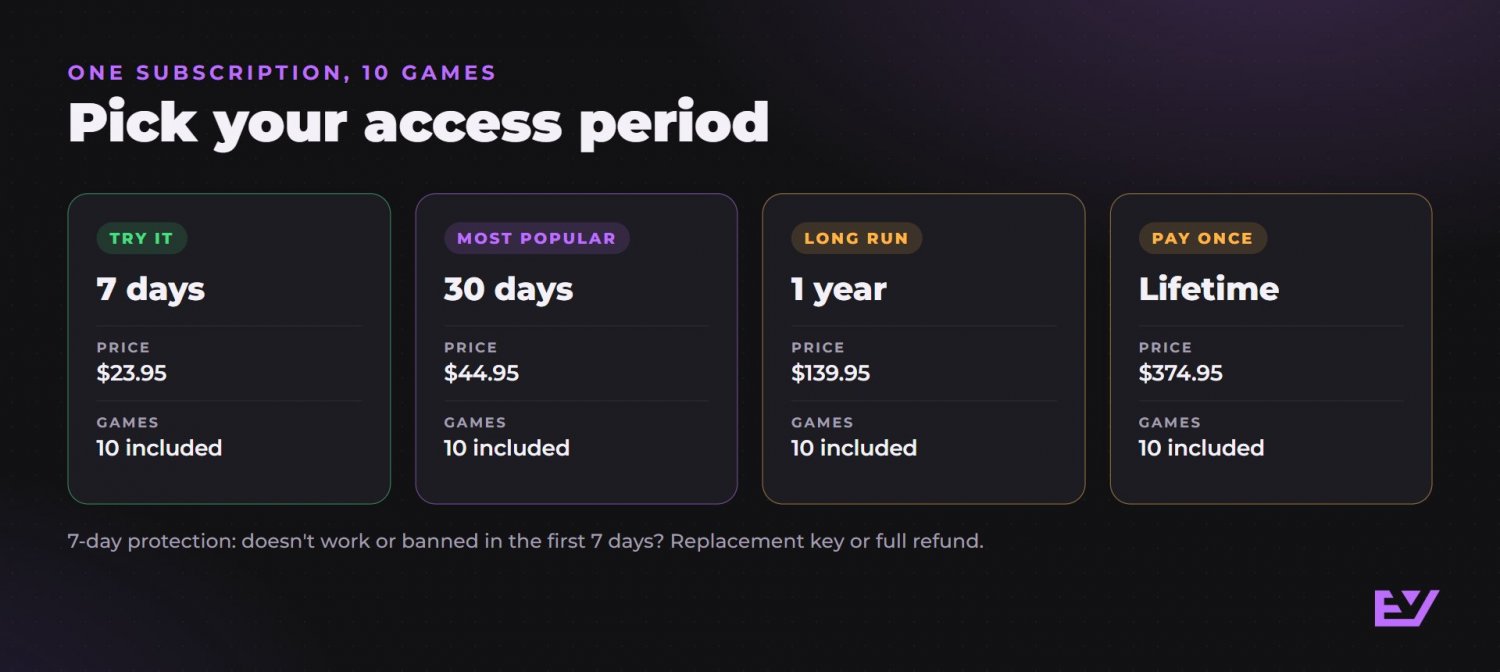
You need Windows 10 or 11, 64-bit, and seven days of access across 10 games costs $23.95.
Windowed, Borderless and Exclusive window modes are supported. Check the current requirements before use. An integrated spoofer is not included.
Every plan includes an access key, installer, setup video and current updates. Most keys arrive within 60 seconds after payment, and support is available 24/7 for payment, setup and access questions.
Status today on the product page: Undetected. Choose the access duration that fits your plans. The 30-day option is marked Most Popular.
Cheating breaks the game's rules and can lead to a ban.
- 7 days: $23.95, 10 games
- 30 days (Most Popular): $44.95, 10 games
- 1 year: $139.95, 10 games
- Lifetime: $374.95, 10 games
FAQ
Does Capture FPS mean the game's frame rate?
Capture FPS controls how many screen frames the aimbot analyzes each second. It describes analysis frequency, separate from the game's rendering frame rate.
Do you have to hold an aim key?
With Enable Aimbot switched on, hold your selected aim key to make the crosshair follow the enemy.
Can you keep different settings for each game?
Yes. Separate saved profiles let you return to one game's settings without replacing the profiles used for other games.
What does the seven-day guarantee cover?
If the product does not work or your account is banned within the first seven days, you get a replacement key or a full refund after a quick check. Buyers also get bonuses on their next purchases.
For 30 days across 10 games at $44.95, with an installer and setup video included and most keys arriving within 60 seconds after payment, consider the Valorant Cheat Evicted AI Aimbot 30-day plan. Open the Valorant AI Aimbot plan page and select 30 Days.
